


Automate crypt exploration in Total Battle
Choose your captains, select the crypt types to ignore and let Crypt Rider handle exploration, march speed-ups and Watchtower navigation.
Control every part of the exploration run
Configure captains, limits and safety options before starting.
Captain selection
Choose one, two or three captains and optionally send two captains to the first or second crypt.
Crypt filters
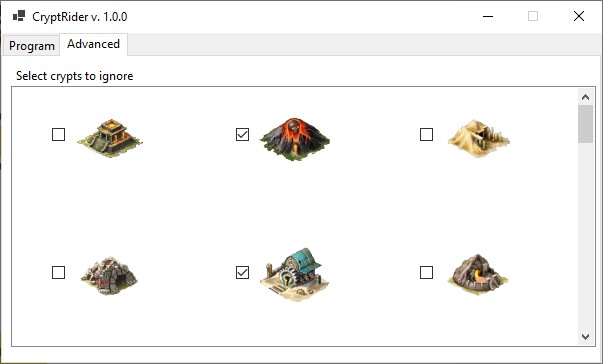
Select the crypt types that should be ignored directly from the visual crypt grid.
Run limits
Run without a limit, stop after a chosen time or finish after a selected number of marches.
March detection
Optionally skip crypts already targeted by clan members or other players. These detection options are marked as beta.
Start exploring in four steps
The refreshed interface guides you through account access, exploration settings and crypt filters.
Prepare Total Battle
Launch the desktop game client, set the game language to English and open the kingdom map.
Prepare Watchtower
Open Watchtower, select Crypts and Arenas and scroll the list all the way to the top.
Configure Crypt Rider
Sign in, select captains, ignored crypts and the desired run limit.
Start exploration
Click START. Use CTRL + Q whenever you need to stop the process.
Install Crypt Rider for Windows
Download the ZIP archive
Use the official download button on this page.
Extract all files
Extract the archive with Windows, 7-Zip or WinRAR.
Launch the program
Open the CryptRider_2_0_0 folder and run CryptRider.exe.
Sign in
Use the Total Battle Helper account to which your tokens are assigned.
Before you begin
- Windows 8 or newer.
- Screen resolution set to 1920 × 1080.
- Windows display scaling set to 100%.
- The official Total Battle desktop client installed.
- Game language set to English.
- Watchtower unlocked and available.
- A Total Battle Helper account with available tokens.
- A stable internet connection.
The program does not start
Extract the complete ZIP to a new folder and run CryptRider.exe. Do not launch the program from inside the archive.
The game interface is not detected
Verify 1920 × 1080 resolution, 100% display scaling and English as the game language.
Crypt Rider cannot find crypts
Open Watchtower, select Crypts and Arenas and scroll the list to the very top before pressing START.
I need help diagnosing a problem
Open Diagnostics in Crypt Rider, generate a package and send the resulting ZIP file to support.
Explore crypts with Crypt Rider
Download version 2.0.0, configure your captains and start automated crypt exploration.
INTRODUCTION
Crypt Rider is a program for automatic crypt exploration. It offers many features such as:
- selecting the number of captains,
- exploring rare crypts,
- filtering which crypts you want to explore.
It allows continuous exploration, time-limited exploration, or a specified number of explorations. When a lack of keys or tar is detected, the program stops the exploration.
The program consumes 25 tokens per single crypt exploration.


Requirements and Installation
- Screen resolution 1920×1080
- Hidden start bar
- Windows 8 or newer
- Game client installed – https://totalbattle.com/download
- Game screen up to 125%
- Display scale set to 100% (setting next to resolution)
- Total Battle Helper (Android) account with purchased tokens
- Enabled Watchtower
- Game language as English
- For the program to work, the button to speed up marching, creating troops or researching must not be visible (in the middle at the top of the screen)
Token purchase:
- Download the Total Battle Helper application from the Google Play store: https://play.google.com/store/apps/details?id=com.silverfox.TotalBattleHelper
and install it on your Android device. - Launch the application and go to the PRO tab in the main menu, then click “Get tokens.”
- Purchase the token package you are interested in.
- Before purchasing, you will be asked to log in to your account or create a new one if you do not have one. After the purchase, the tokens will be assigned to your account.
- If you do not want to spend money, you can use the free tokens offer (the “Get free tokens” button).
- Download the Crypt Rider program available for download on this page.
- Right-click the file and extract it using WinRAR or 7-Zip. (If you are using antivirus software, the program may be flagged as unsafe because it is not signed with a certificate – if you encounter problems with extraction or installation, disable your antivirus software during extraction.)
- After extracting the program, go to the CryptRider_1_0_0_0 folder and launch it by clicking CryptRider.exe.
- After launching the program, a login window will appear – log in using the same account you used to purchase tokens in the Total Battle Helper application.
- If the program does not work, make sure that you have met the requirements described in the REQUIREMENTS section, then check the FAQ page.
- If this does not solve the problem, contact me using the contact form on the website or by sending an e-mail directly to: silver20x18@gmail.com.
- If you attach a screenshot of the entire game with the mercenary exchange location visible to your e-mail, it will speed up the analysis process.
- If the problem cannot be resolved, I will refund your money.
program description

- Number of captains sent (explored crypts).
- Skip already opened rare crypts.
- After losing the network connection, an attempt will be made to resume exploration.
- Use march speed-ups.
- Randomly scrolls the Watchtower.
- Locks Watchtower scrolling (by default, the list is scrolled to avoid exploring the first crypts from the list).
- Sends 2 captains to the second crypt (when exploring with 3 captains).
- Unlimited crypt exploration.
- Time limit.
- Specified number of explorations.
- Exploration time for the time limit.
- Number of marches for the exploration count limit.
- Displays program logs.
- Start / stop exploration button.
- Number of available explorations.
- Number of available tokens.
In the second tab, you can select the crypts that should be skipped.
First launch
- Launch CryptRider.exe.
- Hide the Windows taskbar by right-clicking it, selecting Properties, and enabling the second option from the top: “Automatically hide the taskbar in desktop mode.”
- Launch the game.
- Set your captains to explore crypts – if you are using only 1 captain, remove the others.
- Open the Watchtower and scroll to the top of the list.
- Click the Crypts tab and select which ones should be explored.
- Close the Watchtower and click the START button (if marches are active, the program will wait for the captains to return).
- The program will automatically start exploring crypts.
- To stop the program, press the key combination CTRL + Q.
ADDITIONAL INFORMATION:
- The program will stop when tar runs out.
- If you select the option “Send 2 captains to the second crypt,” the option “Do not explore opened rare crypts” will not work for the second crypt.
- Ignoring many crypts is not recommended.
- There is an option to exchange an old detector key for a package of 100,000 tokens.
Available soon
Mercenary Finder for Android is a simplified version of the Windows program.
It currently supports manual mode and scrolling the map in random directions.
It significantly increases the chances of finding a mercenary exchange; however, it is not as effective as the Windows version.
Requirements and Installation
- Minimum Android version: 8.1
- Game screen zoomed out to 25%
- Total Battle Helper (Android) account with purchased tokens
Token purchase:
- Download the Total Battle Helper application from the Google Play Store:
https://play.google.com/store/apps/details?id=com.silverfox.TotalBattleHelper and install it on your Android device. - Launch the application and go to the PRO tab in the main menu, then click “Get tokens.”
- Purchase the token package you are interested in.
- Before purchasing, you will be asked to log in to your account or create a new one if you do not have one. After the purchase, the tokens will be assigned to your account.
- If you do not want to spend money, you can use the free tokens offer (the “Get free tokens” button).
- Download the APK file by clicking the link below, then install it on your device (since the application is not available on the Google Play Store, you must allow forced installation).
- Launch the application and log in to your account topped up with tokens.
Latest version:
- Mercenary Finder Android APK 1.0.0
- If the program does not work, make sure that you have met the requirements described in the REQUIREMENTS section, then check the Frequently Asked Questions page.
- If this does not solve the problem, contact me using the contact form on the website or by sending an e-mail directly to: silver20x18@gmail.com.
- If you attach a screenshot of the entire game with the mercenary exchange location visible to the e-mail, it will speed up the analysis process.
- If the problem cannot be resolved, I will refund your money.
Application description

1. Current number of tokens on the account and available search time.
2. Your device’s screen resolution.
3. If your device has a different resolution than those available, choose the closest one.
4. If necessary, adjust the search speed so that the map elements have enough time to load.
5. Vibration when an exchange is detected.
6. Beeping sound when an exchange is detected.
7. Automatic map scrolling.
8. Service start button.
9. Logout button.
1. Current search status: red – inactive, green – active.
2. Button to start the search / pause.
3. Panel movement button.
4. Service stop button.
